Home

Download dvd copy software

Compatibility

Tutorial

FAQ

Donate

Compare DVD software

Contact

Newsletter

Links

SHOPPING

COVERS dvd cd

Convert Audio Video

CD RIPPER


Privacy statement

dvd copy

We do not condone copyright infringement and we urge you to respect the copyright laws of your Country.
read more: 1 2 3 4

How To Add files (data or audio) to your compilation

4 ways to add files your compilation:

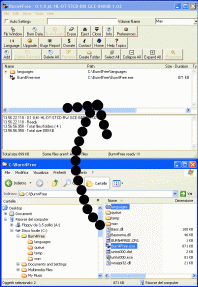
Mode 1 : Classic, drag from explorer/desktop to the Burn4Free main window.
Mode 1 - Classic


Mode 2 : Use Embedded file explorer.
Mode 2 - Embedded Explorer


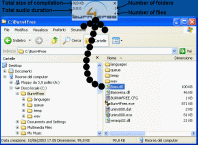
Mode 3 : Use "Fly Window", drag from explorer/desktop to the Burn4Free fly mini, transparent window.
Mode 3 - Fly Window


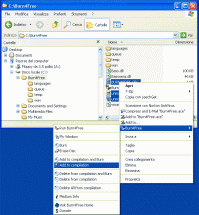
Mode 4 : Select files/folders from explorer/desktop, right click mouse in explorer/desktop and add/burn directly.
Mode 4 - Right click from Explorer